Showing posts with label google apps. Show all posts
Google Revealed Self-Driving Car Prototype With No Steering Wheel Or Pedals
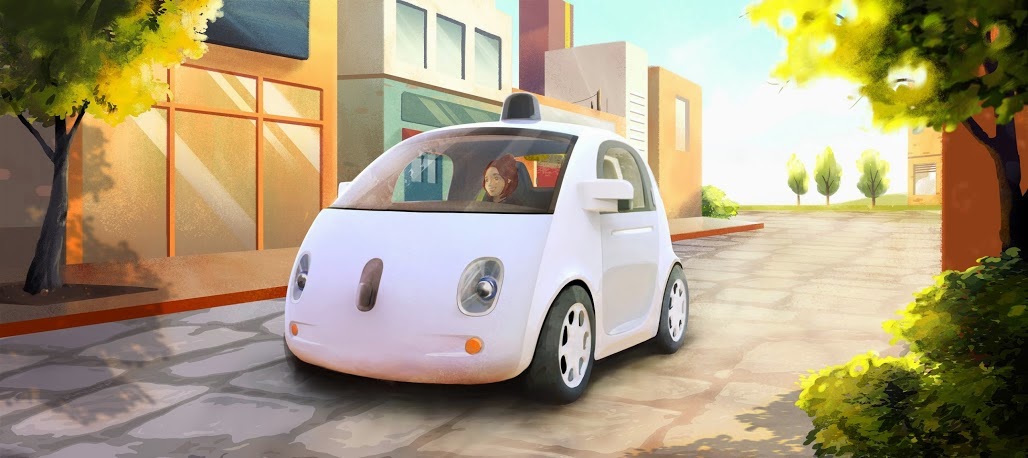
It was in the year 2010 that Google started developing that so called "self driving car" but later this summer, Google revealed it's prototype of a Self-Driving Car with no Steering Wheel or Pedals on it. Designed to operate safely and autonomously without requiring human intervention, this self-driving vehicle has Google Software and sensors which will do all the works and replaced those steering wheel, accelerator pedal, or brake pedal in ordinary cars.
 "The vehicles will be very basic—we want to learn from them and adapt them as quickly as possible—but they will take you where you want to go at the push of a button. And that's an important step toward improving road safety and transforming mobility for millions of people. " said in the post.
Take a look on this first Drive video.
"It was inspiring to start with a blank sheet of paper and ask, “What should be different about this kind of vehicle?” We started with the most important thing: safety. They have sensors that remove blind spots, and they can detect objects out to a distance of more than two football fields in all directions, which is especially helpful on busy streets with lots of intersections. And we’ve capped the speed of these first vehicles at 25 mph. On the inside, we’ve designed for learning, not luxury, so we’re light on creature comforts, but we’ll have two seats (with seatbelts), a space for passengers’ belongings, buttons to start and stop, and a screen that shows the route—and that’s about it." they added.
Know more about this project at their official Google Plus Page: https://plus.google.com/+GoogleSelfDrivingCars
Take a look on this first Drive video.
"It was inspiring to start with a blank sheet of paper and ask, “What should be different about this kind of vehicle?” We started with the most important thing: safety. They have sensors that remove blind spots, and they can detect objects out to a distance of more than two football fields in all directions, which is especially helpful on busy streets with lots of intersections. And we’ve capped the speed of these first vehicles at 25 mph. On the inside, we’ve designed for learning, not luxury, so we’re light on creature comforts, but we’ll have two seats (with seatbelts), a space for passengers’ belongings, buttons to start and stop, and a screen that shows the route—and that’s about it." they added.
Know more about this project at their official Google Plus Page: https://plus.google.com/+GoogleSelfDrivingCars
Kitkat is Android Version 4.4
Sorry Key Lime Pie fans, but chocolate is in this time! Google surprisingly announced to call the next version of mobile operating system Android as KITKAT. This version 4.4 of the OS was supposed to be named Key Lime Pie but the search engine Giant decided to name it from Nestle's chocolate bar.

But if you are thinking Google is paying for Nestle or Nestle to Google, you're wrong. "This is not a money-changing-hands kind of deal," John Lagerling, Director of Android global partnerships, told the BBC news.
From it's previous versions, Google has been consistent to choose dessert-themed codenames progressing a letter in the alphabet. Previous versions have been called Cupcake, Donut, Eclair, Froyo (short for frozen yoghurt), Gingerbread, Honeycomb, Ice Cream Sandwich and Jelly Bean and now with a letter K for Kitkat.
"We realised that very few people actually know the taste of a key lime pie," Lagerling explained. "One of the snacks that we keep in our kitchen for late-night coding are KitKats. And someone said: 'Hey, why don't we call the release KitKat?'

Google has installed a statue of its Android mascot made out of KitKats at its headquarters in Mountain
But if you are thinking Google is paying for Nestle or Nestle to Google, you're wrong. "This is not a money-changing-hands kind of deal," John Lagerling, Director of Android global partnerships, told the BBC news.
From it's previous versions, Google has been consistent to choose dessert-themed codenames progressing a letter in the alphabet. Previous versions have been called Cupcake, Donut, Eclair, Froyo (short for frozen yoghurt), Gingerbread, Honeycomb, Ice Cream Sandwich and Jelly Bean and now with a letter K for Kitkat.
"We realised that very few people actually know the taste of a key lime pie," Lagerling explained. "One of the snacks that we keep in our kitchen for late-night coding are KitKats. And someone said: 'Hey, why don't we call the release KitKat?'
Google has installed a statue of its Android mascot made out of KitKats at its headquarters in Mountain
View, California
So, you guys with Smart phones, what do you think of this move? Speak up!
How To Call Phones from Gmail: A step by step instructions
Last Wednesday, Google introduced a feature that enable a user to call their contacts through their Gmail. After the launch, statistics said the service earned a million calls from users, this is confirmed by Google last Friday.
[Follow bugITs in Twitter]
[Add bugITs from PLURK]
[Subscribe to bugITS - technology news
and updates]
[Subscribe to EUTS: Everything Under the Sun]
Calls to the U.S. and Canada will be free for at least the rest of the year and calls to other countries will be billed with the company's low cost as little as $0.02 per minute. You can check Complete List of Per-minute rates Here.
So how does this service work?
Calling a phone number
1. In your chat list, click the Call phone link
2. In the resulting Call window, dial the number you wish to call (you can use your mouse or your keyboard's number pad)
3. Click the Call button
Note: You must first install the voice and video chat plug-in to make above steps work
Receiving a phone call in Gmail
1. Make at least one outbound call (Calling a phone number) from Gmail.
2. In Google Voice, navigate to Voice settings under the Settings link.
3. In the Phones tab, click the check box next to Google Chat.
Note: You must have a Google Voice Account as prerequisite
Unfortunately, this service is not yet available outside the US and Canada. But Google assured that they are working with this and make it available broadly soon in the months to come.

[Follow bugITs in Twitter]
[Add bugITs from PLURK]
[Subscribe to bugITS - technology news
and updates]
[Subscribe to EUTS: Everything Under the Sun]
Calls to the U.S. and Canada will be free for at least the rest of the year and calls to other countries will be billed with the company's low cost as little as $0.02 per minute. You can check Complete List of Per-minute rates Here.

So how does this service work?
Calling a phone number
1. In your chat list, click the Call phone link
2. In the resulting Call window, dial the number you wish to call (you can use your mouse or your keyboard's number pad)
3. Click the Call button
Note: You must first install the voice and video chat plug-in to make above steps work
Receiving a phone call in Gmail
1. Make at least one outbound call (Calling a phone number) from Gmail.
2. In Google Voice, navigate to Voice settings under the Settings link.
3. In the Phones tab, click the check box next to Google Chat.
Note: You must have a Google Voice Account as prerequisite


Unfortunately, this service is not yet available outside the US and Canada. But Google assured that they are working with this and make it available broadly soon in the months to come.
Online MS Office 2010: for free or not?
It was last week when Microsoft announced that they will offer a "Free" lightweight online version of Microsoft 2010, which includes Word, Excel, Powerpoint and OneNote. Since then, I started to read reviews and press releases of this move from Microsoft and started to draft a post regarding this big change that the company does. But what made me changed my mind to post that said draft is because of Michael Hickins's report on the Hidden cost of Microsoft's Free online office suite.

[Microsoft Office 2010 Logo and its Applications new logos]
[Follow bugITs in Twitter]
[Add bugITs from PLURK]
[Subscribe to bugITS - technology news and updates]
Just a quote from his post, "But wait – there’s more! A Microsoft spokesperson told me that customers will need to buy a SharePoint server, which ranges from $4,400 plus CALs or $41,000, all CALs included if they want to share documents using the online version of Office 2010"
I bet its really clear that there is always a hidden agenda on that Free offerings. And as usual, at the end of the day, business is business.
At first, i enjoyed comparing these two online applications; namely Microsoft office live workspace and Google Docs, but at the end i would prefer to use Google docs than any other, most especially when i used it to convert office 2007 files into 2003. The two web versions of applications, have offer lots of advantages, doing some documents online anytime and anywhere but do Microsoft risks its sells of Office Applications (as we know, Office is the company's big cash drawer) and goes with online versions?

[Google Apps VS Office Live Workspace]
Office 210: The Changes
And now, as what i am always looking forward, is the idea and inquiry what could be the changes that Microsoft can offer rather than the online version thingy?

[2007 VS 2010: Ribbon Changes]
First of all, is the revision of the Microsoft Office 2007 trade mark, the Ribbon. In the offline version, Microsoft designed the Ribbon enclosed with a circular form on which at first i thought it was just another nonfunctional design until such time i learned that it is somewhat like a functional button having there the sub menus; New, Open, Save and others.
Another offering is the photo editing tools, which can now be accessed inside the Ribbon. You just need to open a picture file, then a format tab will show and you can now do some photo enhancement.

[Office 2007: Sub Menus under the Ribbon ]
And another ribbon inclusion program (which is excluded last 2007 version) is the Outlook 2010. It do now have full marked ribbon and is offering the same overall interface except its new feature Quick Steps. Excel and Word have no lots of new features on them not like outlook and of course the PowerPoint which give a video features in it.

Just a note, to access the lightweight version of office 2010, you all need a Windows Live ID (formerly hotmail account). But not so sure if you can have a total access on that package since Microsoft has not released any news about it although they have appended the word "free".
Photo Credit: BBC News
[Microsoft Office 2010 Logo and its Applications new logos]
[Follow bugITs in Twitter]
[Add bugITs from PLURK]
[Subscribe to bugITS - technology news and updates]
Just a quote from his post, "But wait – there’s more! A Microsoft spokesperson told me that customers will need to buy a SharePoint server, which ranges from $4,400 plus CALs or $41,000, all CALs included if they want to share documents using the online version of Office 2010"
I bet its really clear that there is always a hidden agenda on that Free offerings. And as usual, at the end of the day, business is business.
At first, i enjoyed comparing these two online applications; namely Microsoft office live workspace and Google Docs, but at the end i would prefer to use Google docs than any other, most especially when i used it to convert office 2007 files into 2003. The two web versions of applications, have offer lots of advantages, doing some documents online anytime and anywhere but do Microsoft risks its sells of Office Applications (as we know, Office is the company's big cash drawer) and goes with online versions?
[Google Apps VS Office Live Workspace]
Office 210: The Changes
And now, as what i am always looking forward, is the idea and inquiry what could be the changes that Microsoft can offer rather than the online version thingy?
[2007 VS 2010: Ribbon Changes]
First of all, is the revision of the Microsoft Office 2007 trade mark, the Ribbon. In the offline version, Microsoft designed the Ribbon enclosed with a circular form on which at first i thought it was just another nonfunctional design until such time i learned that it is somewhat like a functional button having there the sub menus; New, Open, Save and others.
Another offering is the photo editing tools, which can now be accessed inside the Ribbon. You just need to open a picture file, then a format tab will show and you can now do some photo enhancement.
[Office 2007: Sub Menus under the Ribbon ]
And another ribbon inclusion program (which is excluded last 2007 version) is the Outlook 2010. It do now have full marked ribbon and is offering the same overall interface except its new feature Quick Steps. Excel and Word have no lots of new features on them not like outlook and of course the PowerPoint which give a video features in it.
Just a note, to access the lightweight version of office 2010, you all need a Windows Live ID (formerly hotmail account). But not so sure if you can have a total access on that package since Microsoft has not released any news about it although they have appended the word "free".
Photo Credit: BBC News
Google and Microsoft for Outlook Plugins

Google has built this what they call Google Apps Sync for Microsoft Outlook which is a very useful tool for users and business people to continue using some of their plugins even if they are now switching to Google Apps. In addition, the team focuses on allowing Outlook users to connect to Google Apps for business email, contacts and calendar. But the problem is, some users having plugins with their outlook cannot continue to work with the Google Apps Sync for Microsoft.
[Follow bugITs in Twitter]
[Add bugITs from PLURK]
[Subscribe to bugITS - technology news and updates]

And Last Tuesday, Chris Vander Mey, Senior Product Manager, Google Apps, highlighted some of this unworkable plugins:
- Microsoft Office Outlook Connector
- Acrobat PDF Maker Toolbar
- Outlook Change Notifier
Programs that interact directly to outlook data file:
- Windows Desktop Search
- PGP.com's encryption plugin
So far, Google Apps team is currently working with Microsoft and other partners for the resolution of these bugs.


