Showing posts with label Google Plus. Show all posts
Google Revealed Self-Driving Car Prototype With No Steering Wheel Or Pedals
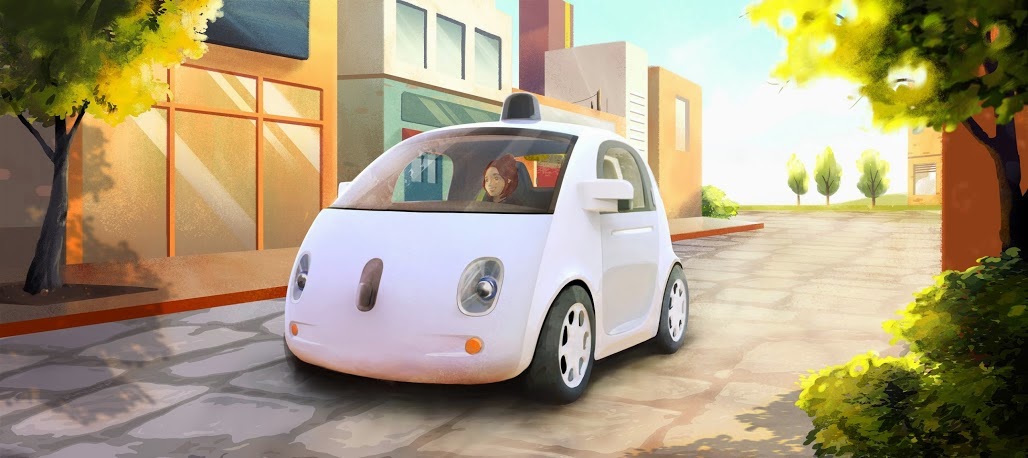
It was in the year 2010 that Google started developing that so called "self driving car" but later this summer, Google revealed it's prototype of a Self-Driving Car with no Steering Wheel or Pedals on it. Designed to operate safely and autonomously without requiring human intervention, this self-driving vehicle has Google Software and sensors which will do all the works and replaced those steering wheel, accelerator pedal, or brake pedal in ordinary cars.
 "The vehicles will be very basic—we want to learn from them and adapt them as quickly as possible—but they will take you where you want to go at the push of a button. And that's an important step toward improving road safety and transforming mobility for millions of people. " said in the post.
Take a look on this first Drive video.
"It was inspiring to start with a blank sheet of paper and ask, “What should be different about this kind of vehicle?” We started with the most important thing: safety. They have sensors that remove blind spots, and they can detect objects out to a distance of more than two football fields in all directions, which is especially helpful on busy streets with lots of intersections. And we’ve capped the speed of these first vehicles at 25 mph. On the inside, we’ve designed for learning, not luxury, so we’re light on creature comforts, but we’ll have two seats (with seatbelts), a space for passengers’ belongings, buttons to start and stop, and a screen that shows the route—and that’s about it." they added.
Know more about this project at their official Google Plus Page: https://plus.google.com/+GoogleSelfDrivingCars
Take a look on this first Drive video.
"It was inspiring to start with a blank sheet of paper and ask, “What should be different about this kind of vehicle?” We started with the most important thing: safety. They have sensors that remove blind spots, and they can detect objects out to a distance of more than two football fields in all directions, which is especially helpful on busy streets with lots of intersections. And we’ve capped the speed of these first vehicles at 25 mph. On the inside, we’ve designed for learning, not luxury, so we’re light on creature comforts, but we’ll have two seats (with seatbelts), a space for passengers’ belongings, buttons to start and stop, and a screen that shows the route—and that’s about it." they added.
Know more about this project at their official Google Plus Page: https://plus.google.com/+GoogleSelfDrivingCars
Check GOOGLE + New Interface and New Look
So after the controversial Facebook Cover Photo and Timeline, Google +, Google's Social networking site or platform just recently rolled out their new offering to netizens most especially on its interface, navigation and look, not to mention its Cover Photo situated in the uppermost part of your profile (sounds familiar, huh?). In this update, Google Plus aims to allow users to create a more customized experience on the site.

Explore Google Plus with the video after jump
Navigation Update:
First thing I notice is the dynamic ribbon of applications on the leftmost part of the page and this includes:
“Taken together, these powers make it easier to access your favorites, and to adjust your preferences over time,” Google senior vice president Vic Gundotra wrote on Google’s Official Blog. “We’ve also built the ribbon with the future in mind, giving us an obvious (and clutter-free) space for The Next Big Feature, and The Feature After That. So stay tuned.”
"By focusing on you, the people you care about, and the stuff you’re into, we’re going to continue upgrading all the features you already know and love—from Search and Maps to Gmail and YouTube. With today’s foundational changes we can move even faster—toward a simpler, more beautiful Google." ended Vic Gundotra
What do you think of this latest rollout? Can Google Plus compete with Facebook by then?
Check out Cebu Bloggers Society Inc. Founder Google Plus profile
Explore Google Plus with the video after jump
Navigation Update:
First thing I notice is the dynamic ribbon of applications on the leftmost part of the page and this includes:
- You can drag apps up or down to create the order you want
- You can hover over certain apps to reveal a set of quick actions
- You can show or hide apps by moving them in and out of “More”
“Taken together, these powers make it easier to access your favorites, and to adjust your preferences over time,” Google senior vice president Vic Gundotra wrote on Google’s Official Blog. “We’ve also built the ribbon with the future in mind, giving us an obvious (and clutter-free) space for The Next Big Feature, and The Feature After That. So stay tuned.”
"By focusing on you, the people you care about, and the stuff you’re into, we’re going to continue upgrading all the features you already know and love—from Search and Maps to Gmail and YouTube. With today’s foundational changes we can move even faster—toward a simpler, more beautiful Google." ended Vic Gundotra
What do you think of this latest rollout? Can Google Plus compete with Facebook by then?
Tag :
google,
Google Plus
Google Launches Google+ Pages for Businesses
As expected, Google announced on Monday the PAGES feature in their own version of Facebook, the Google Plus (+). In this move, it gives opportunity to brands, organizations and other business outfits to join and interact with their customers who are currently using the social network site.
If you are now in your Google Plus Profile, in your homepage, there is a Create a Google + Page icon located in the bottom right of the page.

[Add bugITs from PLURK]
[Subscribe to bugITS - technology news
and updates]
[Subscribe to EUTS: Everything Under the Sun]
[Entertainment Updates - Total Showbiz]
Simply follow its instructions and make sure to choose the right category that represents the page.


Looking forward, Google will be implementing a feature called "Direct Connect.". This feature takes you directly to a certain Google Plus page if you are doing a research.Direct Connect is also being rolled out incrementally, thus, it doesn't yet work for all pages.
Google Plus: How to Invite Friends by Email?
Days after the launching of Google Plus to selected invitees, I was able to make my own account and started adding my Facebook's friends to my Circle of Friends.

[Follow bugITs in Twitter]
[Add bugITs from PLURK]
[Subscribe to bugITS - technology news
and updates]
[Subscribe to FaceCebu's Facebook Page]
[Entertainment Updates - Total Showbiz]
[Face of Cebu: Entertainment, Lifestyle, Events]
So if you need help in inviting your friends through email, check below instruction.
1. In Google Plus, Click on the Circles button located at the top of the page:

2. Once in Circles, Click on "Find and Invite", as shown below:

3. Click the "Add a new person" button:

4. Enter the email address of the person you want to add in the Circle.

5. Now click the Add "@domain.com" by email

6. Type in the owner's name of the email address, choose where to add him/her into Circle (Friends, family, Acquaintances and Following) and click Save
Then let your friend wait for the generated email by Google Plus team.
As of now, invitation took days to be received by your friend but I believe Gplus team has something to do about it.
Enjoy Google Plus and let us start encircling our friends!
[Follow bugITs in Twitter]
[Add bugITs from PLURK]
[Subscribe to bugITS - technology news
and updates]
[Subscribe to FaceCebu's Facebook Page]
[Entertainment Updates - Total Showbiz]
[Face of Cebu: Entertainment, Lifestyle, Events]
So if you need help in inviting your friends through email, check below instruction.
1. In Google Plus, Click on the Circles button located at the top of the page:
2. Once in Circles, Click on "Find and Invite", as shown below:
3. Click the "Add a new person" button:
4. Enter the email address of the person you want to add in the Circle.
5. Now click the Add "
6. Type in the owner's name of the email address, choose where to add him/her into Circle (Friends, family, Acquaintances and Following) and click Save
Then let your friend wait for the generated email by Google Plus team.
As of now, invitation took days to be received by your friend but I believe Gplus team has something to do about it.
Enjoy Google Plus and let us start encircling our friends!
Tag :
Google Plus,
social network


